Free WooCommerce plugin for the Polish market. GPSR, Omnibus, GDPR, KSeF, unit prices, withdrawals, food products and 30 storefront modules in one package.
EN

Polski for WooCommerce - adapt your store to the Polish market

43min read
WooCommerce expert
500+ WP projects

#Polski for WooCommerce

A free plugin that adapts WooCommerce to Polish legal and business requirements. GPSR, Omnibus, GDPR, DSA, KSeF-ready and storefront features in one place.

Polski for WooCommerce brings together the requirements of the Polish market, current EU directives and store functionality in a single plugin. Instead of installing 10 separate plugins to handle unit prices, withdrawal forms, GPSR, DSA, food data, compliance auditing and merchandising tools - you get everything in one package.

The plugin is currently under review at WordPress.org. Source code is available on GitHub.

Requirements: WordPress 6.4+, WooCommerce 8.0+, PHP 8.1+ | Version: 1.3.0 | License: GPLv2

Need PDF invoices, KSeF, NIP validation, InPost or multi-step checkout? See Polski PRO - the premium extension that adds operational features to the free version.


#Table of contents


#Installation and configuration

#Getting started

Configuring Polski for WooCommerce involves 6 steps. Most settings work with their default values - just enable the modules you need.


#Installation

  1. Go to Plugins > Add New
  2. Search for Polski for WooCommerce
  3. Click Install and then Activate
  4. A new Polski menu will appear in the sidebar

#Manually from a ZIP file

  1. Download the ZIP from GitHub
  2. Go to Plugins > Add New > Upload Plugin
  3. Select the ZIP file and click Install
  4. Click Activate

#Enabling modules

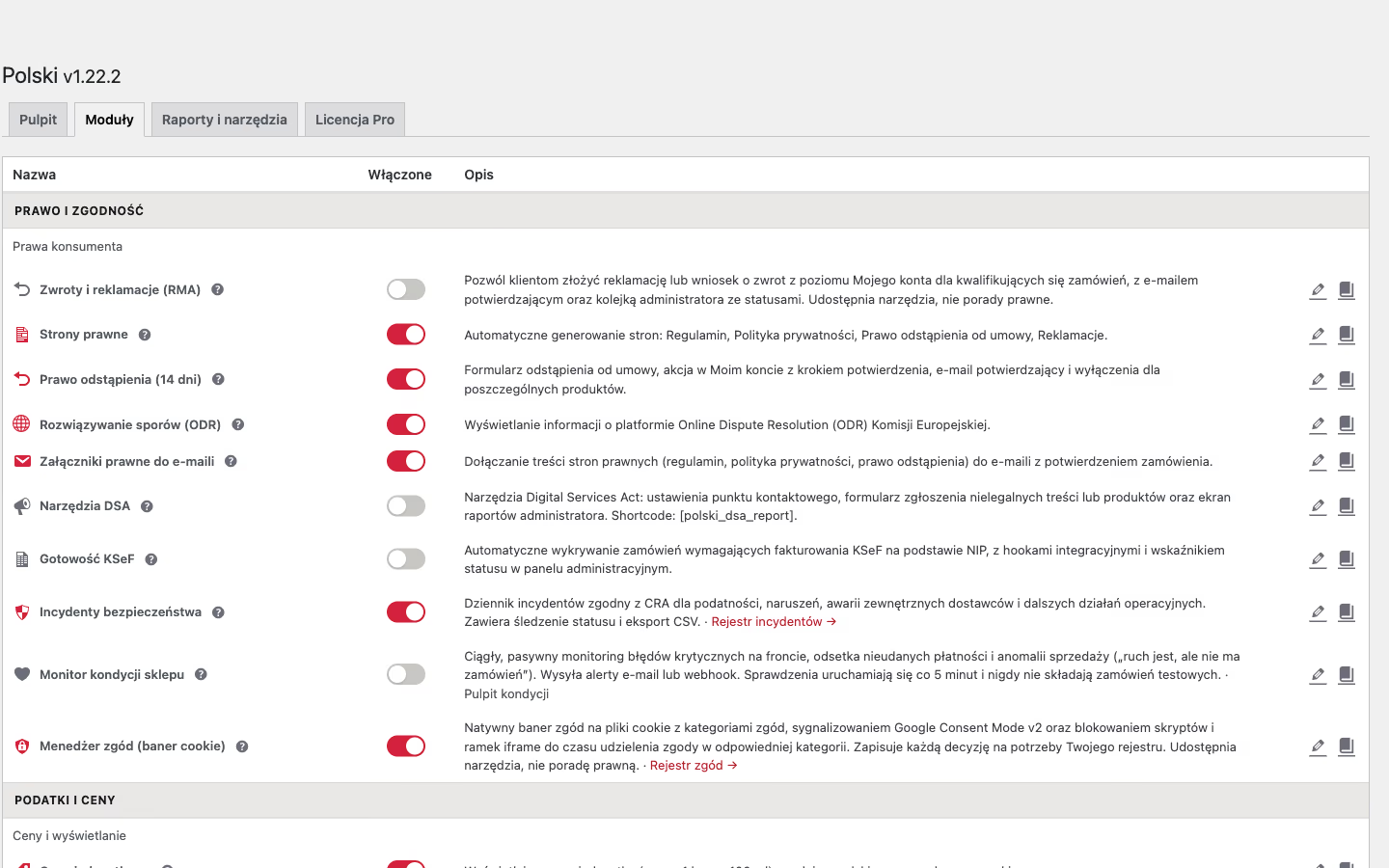
After activation, go to Polski > Modules. You will see a list of 42 available modules grouped into categories:

  • Prices and Omnibus - unit price, lowest price in 30 days, VAT display, “from” price for variable products, OSS threshold observer (€10,000)
  • Checkout - order button, legal checkboxes, VAT ID, minimum order value/quantity rules
  • Legal compliance - GPSR, DSA, KSeF, greenwashing, GDPR
  • Consumer rights - withdrawal form, legal pages, ODR
  • Product information - delivery time, manufacturer, brands, GTIN
  • Food products - nutritional values, allergens, Nutri-Score
  • Storefront modules - wishlist, compare, quick view, filters, search
  • Email - legal attachments, double opt-in, automated review request emails after purchase
  • Tools - compliance dashboard, store audit

Each module has an on/off toggle. Enable the ones you need.


For basic compliance with Polish law, enable:

  1. Legal checkboxes - go to the module settings, enable checkboxes for terms of service, privacy policy and withdrawal rights
  2. Order button - automatically changes the button text to the legally required “I order with obligation to pay”
  3. Legal pages - select your Terms of Service, Privacy Policy and Withdrawal Rights pages

#VAT configuration

  1. Make sure you have the correct VAT rates in WooCommerce > Settings > Tax (23%, 8%, 5%, 0%)
  2. Enable the VAT display module and choose a mode (gross/net)
  3. If you use the VAT exemption (Article 113) - tick the appropriate checkbox

#GPSR (if you sell physical products)

From 13 December 2024, the GPSR regulation requires product pages in online stores to include manufacturer data and the responsible person’s details. Enable the GPSR module and fill in the data in the Polski tab within the product editor.


#Compliance dashboard

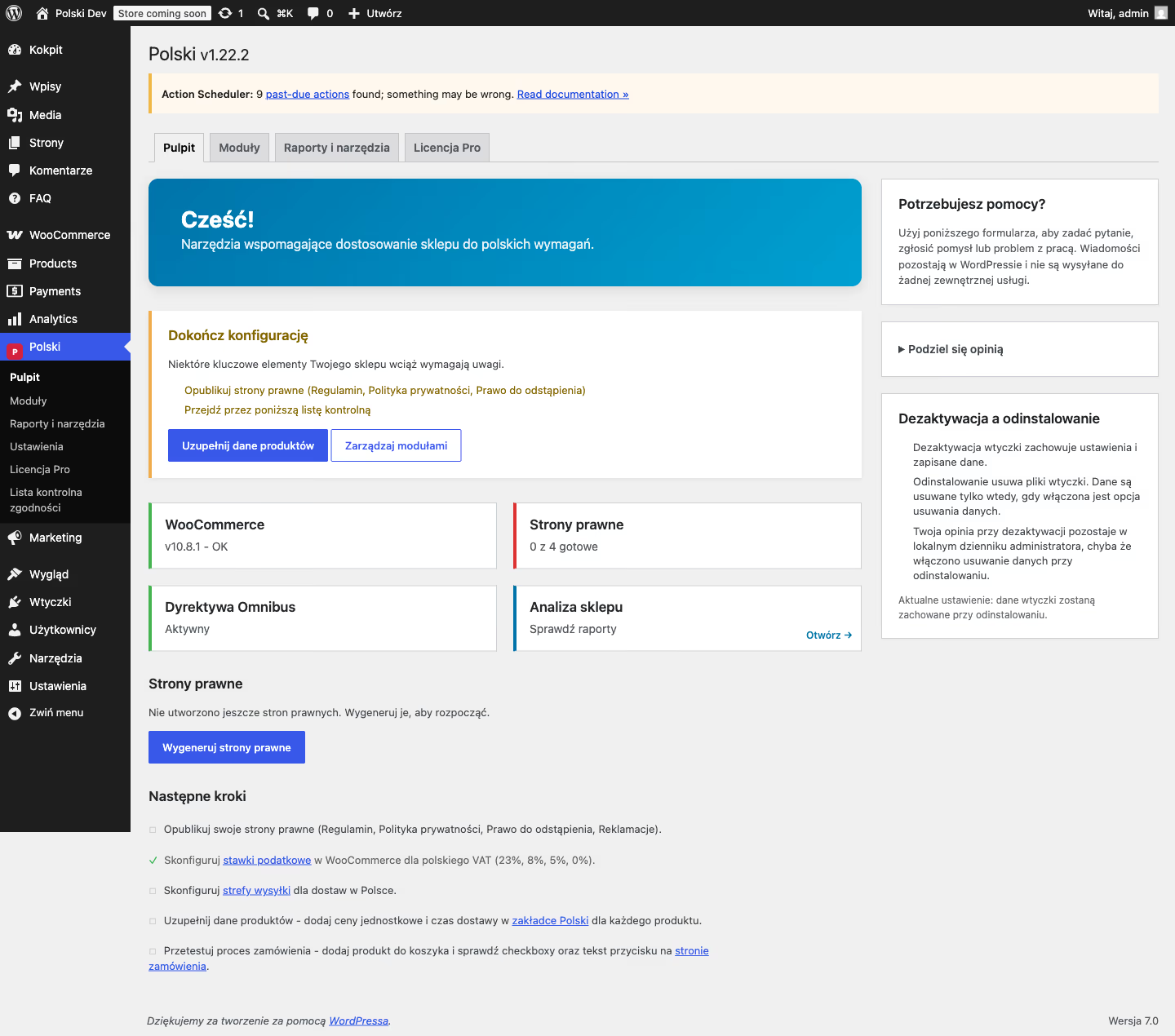
Go to Polski > Dashboard and click Check compliance. The system will verify:

  • Whether legal pages are created and assigned
  • Whether legal checkboxes are enabled at checkout
  • Whether the order button has the correct text
  • Whether VAT rates are configured
  • Whether GPSR data is filled in (if the module is active)

A green/red result for each item. Fix the red items and check again.


#Theme templates

All plugin templates can be overridden from your theme. Copy the file from wp-content/plugins/polski/templates/ to wp-content/themes/your-theme/polski/ and edit it.


#REST API

The plugin exposes a full REST API under the polski/v1/ namespace:

  • GET /polski/v1/settings - retrieve settings
  • POST /polski/v1/settings - update settings
  • GET /polski/v1/withdrawals - list withdrawal requests
  • GET /polski/v1/checkboxes - checkbox configuration

API documentation is available after installing the plugin.


#WP-CLI

wp polski migrate        # run database migrations
wp polski smoke-test     # verify installation integrity

#GPSR - general product safety

From 13 December 2024, EU Regulation 2023/988 (GPSR - General Product Safety Regulation) requires online store product pages to include manufacturer data and details of the person responsible for product compliance. The GPSR module in Polski for WooCommerce automatically displays this information on the product page and provides management tools in the admin panel.


#Enabling the module

  1. Go to Polski > Modules
  2. Find the Legal compliance section
  3. Enable the GPSR module
  4. Save changes

Once enabled, the module registers new fields in the product editor and adds a status column to the product list.


#GPSR fields in the product editor

After enabling the module, a GPSR - Product safety section appears in each product editor (in the Polski tab). It contains 8 fields:

FieldTypeDescription
Manufacturer nametextFull name of the entity that manufactured the product
Manufacturer addresstextareaFull postal address of the manufacturer
Importer nametextImporter name (fill in if the product comes from outside the EU)
Importer addresstextareaFull postal address of the importer
Responsible persontextEU entity responsible for product compliance with GPSR
Product identifiertextBatch number, serial number or other identifier
Safety warningstextareaWarnings required by regulations or the manufacturer
Safety instructionstextareaInstructions for safe use

The GPSR section on the product page is only displayed when at least one field is filled in. Data is presented in a <details> element with the heading “Product safety (GPSR)” - the customer can expand it by clicking.


#Display on the product page

The module automatically injects the GPSR section below the product information (hook woocommerce_product_meta_end). It shows only fields that have a value.

HTML structure of the section:

<div class="polski-gpsr-info">
  <details class="polski-gpsr-info__details">
    <summary class="polski-gpsr-info__summary">Product safety (GPSR)</summary>
    <dl class="polski-gpsr-info__list">
      <dt>Manufacturer</dt>
      <dd>Manufacturer name</dd>
      <!-- additional fields -->
    </dl>
  </details>
</div>

You can customise the section styling via CSS in your theme, using the classes .polski-gpsr-info, .polski-gpsr-info__details and .polski-gpsr-info__list.

If you want to change the layout or content of the section, copy the template from: wp-content/plugins/polski/templates/single-product/gpsr-info.php to: wp-content/themes/your-theme/polski/single-product/gpsr-info.php


#GPSR status column on the product list

On the product list (Products > All Products), the module adds a GPSR column with a visual indicator of how many fields are filled:

  • Green checkmark (checkmark) - 3 or more of 8 fields filled
  • Yellow warning triangle - 1-2 fields filled
  • Grey dash - no fields filled

Hovering over the icon shows a tooltip with the number of filled fields, e.g. “5/8 fields filled”. This lets you quickly identify products that need GPSR data without opening each one individually.


#CSV import and export

The GPSR module is fully supported by the CSV import/export mechanism in Polski for WooCommerce. This is the fastest way to fill in GPSR data for many products at once.

#Export

  1. Go to Polski > Import / Export CSV
  2. Click Export products
  3. Download the CSV file

In the CSV file, each product has GPSR columns with the polski_gpsr_ prefix:

CSV columnCorresponding field
polski_gpsr_manufacturer_nameManufacturer name
polski_gpsr_manufacturer_addressManufacturer address
polski_gpsr_importer_nameImporter name
polski_gpsr_importer_addressImporter address
polski_gpsr_responsible_personResponsible person
polski_gpsr_product_identifierProduct identifier
polski_gpsr_safety_warningsSafety warnings
polski_gpsr_instructionsSafety instructions

#Import

  1. Fill in the GPSR columns in the CSV file (the id or sku column is required for product identification)
  2. Go to Polski > Import / Export CSV
  3. Upload the file and click Import
  4. The plugin will update product meta for all rows in the file

The import overwrites existing values. Empty cells in the CSV remove previously saved data for that field.


#Omnibus - lowest price in 30 days

The Omnibus module in Polski for WooCommerce automatically tracks product price history and displays the lowest price from the last 30 days for products on sale. It satisfies the requirements of the Omnibus Directive (EU 2019/2161), which has been in force in Poland since 1 January 2023.


#What is the Omnibus Directive?

The Omnibus Directive (EU 2019/2161) requires online stores to inform customers of the lowest price of a product over the past 30 days whenever a product is presented as being on sale. This means that alongside the crossed-out (regular) price and the promotional price, a message such as “Lowest price in the last 30 days: $89.00” must appear.

The module records the price on every product save and stores the history automatically. No manual data entry is required.


#Enabling the module

  1. Go to Polski > Modules
  2. Find the Lowest price (Omnibus) module in the “Prices and Omnibus” group
  3. Enable the toggle and click Save settings
  4. From this point the plugin starts recording prices on every product save

#How price tracking works

The price is recorded automatically in two situations:

  • when a simple product is saved (woocommerce_update_product, woocommerce_new_product)
  • when a variation of a variable product is saved (woocommerce_save_product_variation)

A maximum of one record per product is saved each day - duplicates are skipped. The module tracks both the regular price and the sale price. The lowest effective price over the tracking period is calculated automatically at display time.

Old records are removed automatically by the cron job (polski_daily_maintenance) according to the “Keep history (days)” setting.


#Module settings

#Price tracking

SettingDefault valueDescription
Tracking period (days)30Number of days used when calculating the lowest price. The Directive requires a minimum of 30 days.
Keep history (days)90Records older than this limit are automatically removed from the database.
Prices with taxenabledWhen active, tracks and displays gross prices (including VAT).

#Display

SettingDefault valueDescription
Sale products onlyenabledThe message appears only when the product has an active sale price.
Product pageenabledDisplays the message on the single product page.
Product listing (shop, categories)disabledShows the message in the product loop.
Related and featured productsdisabledShows the message in “Related products” and “Featured” sections.
CartdisabledShows the message next to the product in the cart.
Show regular price (before sale)disabledAdditional information about the price before the sale started.

#Message template

SettingDefault valueDescription
Message textLowest price in the last {days} days: {price}Text displayed next to the product. Supports variables: {price}, {days}, {date}, {regular_price}.
No price historyHide messageBehaviour when no historical data exists: hide / show current price / custom text.
Custom text (no history)Price has not changed in the last {days} daysText displayed when there is no history and the “custom text” option is selected.
Counted fromSale start dateReference point: sale start date or today’s date.

#Variable products

SettingDefault valueDescription
Track variations separatelyenabledEach variation of a variable product has its own independent price history.

#Template variables

In the “Message text” field you can use the following variables:

  • {price} - lowest effective price over the tracking period (formatted, with currency)
  • {days} - number of days from the “Tracking period” setting
  • {date} - date on which the lowest price was recorded
  • {regular_price} - regular product price before the sale

Example messages:

Lowest price in the last {days} days: {price}
Previous lowest price: {price} (over the last {days} days)
Price before sale: {regular_price} | Lowest in 30 days: {price}

#Shortcode

The shortcode [polski_omnibus_price] lets you display the lowest price information anywhere - in a product description, a page template or a page builder element.

Basic use (displays the price of the current product in the WooCommerce loop):

[polski_omnibus_price]

With a specific product (outside the WooCommerce loop, e.g. on a text page):

[polski_omnibus_price product="123"]

Where 123 is the product ID. The shortcode returns an empty string when the product is not on sale (with the default “Sale products only” setting) or when no historical data exists.


#Compatibility with external Omnibus plugins

Polski for WooCommerce automatically detects popular third-party Omnibus solutions (e.g. wc-price-history). When such a plugin is active, the module delegates data retrieval to it instead of using its own price history database. Integration status is visible in the module panel.

When no external plugin is installed, the built-in tracking system is used.


#CSS classes and HTML filter

The generated HTML has the following structure:

<div class="polski-omnibus-price">
  <span class="polski-omnibus-price__text">Lowest price in the last 30 days: $89.00</span>
</div>

You can modify the appearance via CSS in your theme or use the PHP filter:

add_filter('polski/price/omnibus_html', function (string $html, $lowest, $product): string {
    // $lowest is an OmnibusPrice object with effectivePrice() and currency fields
    // $product is a WC_Product object
    return $html;
}, 10, 3);

Related cluster

Explore other WordPress services and knowledge base

Strengthen your business with professional technical support in key areas of the WordPress ecosystem.

What is Polski for WooCommerce and what does it do?
Polski for WooCommerce is a free open source plugin that adapts a WooCommerce store to Polish legal and business requirements and current European Union directives. It includes over 40 modules covering GPSR, the Omnibus directive, GDPR, DSA, KSeF-ready, withdrawal forms, unit prices, food data and 13 merchandising tools. Instead of installing a dozen separate plugins for each requirement, you get everything in one package with a single admin panel. The plugin is compatible with WooCommerce Blocks, HPOS and PHP 8.1+, making it ready for the latest versions of WordPress and WooCommerce.
Is the plugin free and where can I download it?
Yes, Polski for WooCommerce is completely free and distributed under the GPLv2 license. The plugin is currently under review at WordPress.org - once approved it will be available for download directly from the WordPress plugin repository (Plugins > Add New > search 'Polski for WooCommerce'). The source code is publicly available on GitHub at github.com/wppoland/polski. There are no hidden fees, feature restrictions or forced upsells - all 42 modules are available at no cost.
Which EU directives and regulations does the plugin support?
The plugin supports six key regulations: GPSR (general product safety - 8 fields with manufacturer and responsible person data), the Omnibus directive (automatic tracking and display of the lowest price in 30 days), GDPR (7 configurable consent checkboxes with a full audit trail), DSA (illegal content reporting form with a management panel), KSeF-ready (automatic detection of orders requiring an e-invoice based on NIP) and the anti-greenwashing directive (eco claim verification fields per product). Each regulation has a dedicated module with settings that can be enabled or disabled independently of the others.
Do I need technical knowledge to configure the plugin?
No - the plugin is designed so that a non-technical person can set it up in 10-15 minutes. The admin panel built in React offers module toggles and dedicated settings pages with descriptions in Polish. The compliance dashboard shows green/red status with a single click, indicating what needs attention. The setup wizard guides you step by step through setting up company data, legal pages and checkout checkboxes. For advanced users, REST API, PHP hooks and WP-CLI commands are available.
What is GPSR and why does my store need it?
GPSR (General Product Safety Regulation) is an EU regulation in force since 13 December 2024 that requires online store product pages to include manufacturer data, importer data, the EU responsible person, product identifiers, and safety warnings and instructions. Failure to include this information can result in financial penalties and removal of products from marketplaces. The plugin adds 8 GPSR fields to the editor of every WooCommerce product, displays them automatically on the product page, offers bulk CSV import and export, and shows a compliance status column in the product list in the admin panel.
How does the withdrawal form work and what does Directive 2023/2673 change?
EU Directive 2023/2673, mandatory from 19 June 2026, requires online stores to allow customers to submit a withdrawal declaration directly from the store page - via a button, not just a downloadable PDF form. The plugin adds a 'Withdraw from contract' button in the My Account section next to each order eligible for return. The customer clicks the button, sees a confirmation page, and after confirmation the system automatically creates a request, sends an email confirmation and records a full audit trail. The administrator manages requests from a dedicated panel with statuses: Submitted, Confirmed, Completed, Rejected.
Does the plugin support food products and food labelling?
Yes - the Food Products module is a complete food labelling solution for WooCommerce. It covers a nutritional values table (per 100g or 100ml with configurable column labels), an allergen declaration with a dedicated taxonomy, an ingredient list, a Nutri-Score badge (A-E with colour coding), alcohol content, net quantity, place of origin and distributor data. All information is displayed in an organised table on the product page. The [polski_nutrients] shortcode allows you to embed the nutritional values table anywhere, and data can be imported in bulk via CSV.
Where can I report a bug or suggest a new feature?
Report bugs and technical issues on GitHub Issues at github.com/wppoland/polski/issues - describe the problem, provide your WordPress, WooCommerce and PHP versions, the list of active plugins and the steps to reproduce. Raise questions, ideas for new features and discussions on GitHub Discussions at github.com/wppoland/polski/discussions - this is the place for less urgent conversations and sharing experiences with other users. If you are not a technical person, you can also send feedback directly from the plugin panel - the feedback form is available in the sidebar on every Polski settings page.

Need an FAQ tailored to your industry and market? We can build one aligned with your business goals.

Let’s discuss

Related Articles

Headless WooCommerce shifts cost and complexity. It pays back when mobile Core Web Vitals are tied to revenue, when the catalogue stabilises, and when a senior front-end engineer is in the loop. It does not pay back for tiny shops or for sites where the bottleneck is not the front.
wordpress

Headless WordPress for WooCommerce: when it pays back, and what to skip

Headless WooCommerce shifts cost and complexity. It pays back when mobile Core Web Vitals are tied to revenue, when the catalogue stabilises, and when a senior front-end engineer is in the loop. It does not pay back for tiny shops or for sites where the bottleneck is not the front.

Master every aspect of WooCommerce performance optimization - from database tuning and Redis caching to cart fragment fixes and headless architecture. Practical steps with measurable results.
wordpress

WooCommerce Performance Optimization: The Complete Guide 2026

Master every aspect of WooCommerce performance optimization - from database tuning and Redis caching to cart fragment fixes and headless architecture. Practical steps with measurable results.

How to build a fast e-commerce store with Headless WooCommerce and Astro. Architecture deep-dive, performance comparison, and step-by-step implementation guide.
wordpress

Headless WooCommerce with Astro: The E-commerce Performance Guide 2026

How to build a fast e-commerce store with Headless WooCommerce and Astro. Architecture deep-dive, performance comparison, and step-by-step implementation guide.