Cloudflare just dropped a CMS, and it is aiming at WordPress
On April 1, 2026, Cloudflare published a blog post that many initially dismissed as an elaborate April Fools’ joke. The title alone - “Introducing EmDash: the spiritual successor to WordPress” - seemed designed to provoke. But the accompanying GitHub repository, the detailed technical documentation, and the MIT license file all pointed to the same conclusion: Cloudflare is serious. EmDash is a real, open-source, full-stack TypeScript CMS built on the Astro framework, and it is explicitly positioning itself as the next generation of content management for the web.
For those of us who have spent years building on WordPress, this is a moment that deserves careful attention. Not panic, not dismissal, but honest evaluation. At wppoland.com, we are a WordPress-focused publication, and we have no interest in hyping a competitor for clicks. What we do have is a responsibility to give our readers the full picture when something genuinely significant happens in the CMS landscape. EmDash qualifies.
This article breaks down what EmDash actually is, what it does differently from WordPress, what the community thinks, and what WordPress professionals should realistically do about it.
Why the name “EmDash”? The philosophy behind the spiritual successor
The name EmDash ( - ) is deliberate. An em dash is a typographic character that signals a break, a change of direction, or a continuation of thought. Cloudflare chose it to emphasize that EmDash continues the idea of WordPress - ease of use, openness, ecosystem - but executes it in an entirely new way.
WordPress was born in 2003 as a simple blogging fork of b2/cafelog. EmDash was built in roughly two months in 2026. And while that sounds like a joke, the team behind it is Cloudflare - a company that handles a significant portion of global internet traffic. This is not a WordPress fork. It is a complete ground-up reconstruction. EmDash contains not a single line of WordPress code, which is why it could be released under the MIT license instead of GPL. That is a significant legal difference - MIT code is more permissive and easier to use commercially without copyleft restrictions.
What is EmDash
EmDash is a full-stack content management system written entirely in TypeScript. It uses Astro as its foundation framework and ships as an Astro integration, meaning you install it into an Astro project and get a complete CMS with an admin panel, REST API, media library, and plugin system. The project is MIT licensed and hosted on GitHub at github.com/emdash-cms/emdash.
Cloudflare announced EmDash through their official blog on blog.cloudflare.com, describing it as a CMS “designed from first principles for the modern web.” The initial release is version 0.1.0, placing it firmly in early beta territory. The Cloudflare blog post was written with full awareness of the timing - April 1 - and even acknowledged the skepticism that would follow. But the code is real, the documentation is real, and the architectural decisions are substantive.
The name “EmDash” refers to the typographic character ( - ), a deliberate nod to the publishing roots of content management. It is a small detail, but it signals that the team behind this project understands the heritage they are engaging with.
Getting started
Setting up a new EmDash site takes a single command:
npm create emdash@latestThe CLI scaffolds a complete Astro project with EmDash pre-configured. From there, the Astro config wires everything together:
// astro.config.mjs
import emdash from "emdash/astro";
import { d1 } from "emdash/db";

export default defineConfig({
  integrations: [emdash({ database: d1() })],
});
That single integration gives you an admin panel, REST API, media library, and plugin system. If you have worked with WordPress’s wp-config.php, you can think of this as the equivalent - but with typed configuration and a modular architecture.
Key components
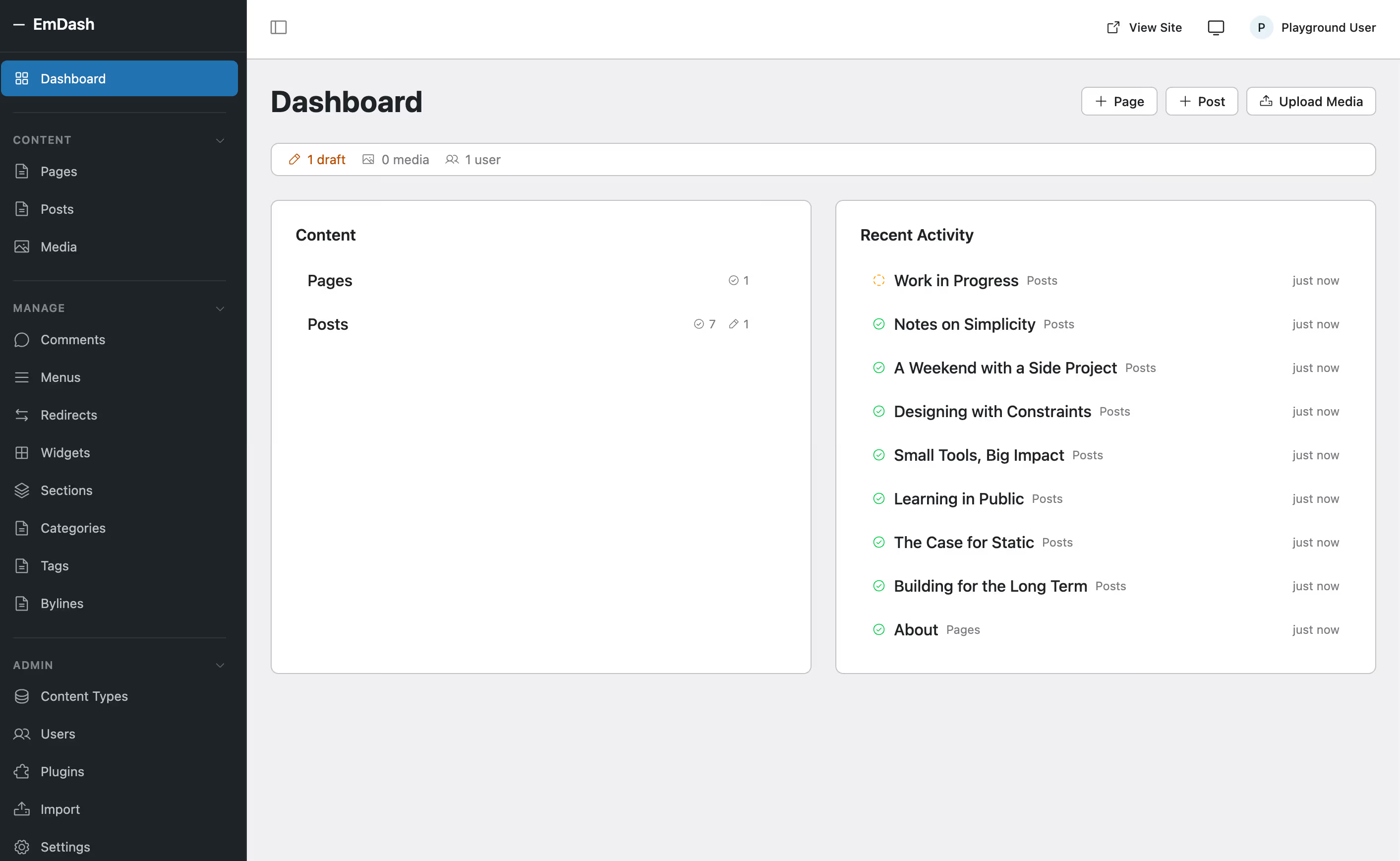
EmDash ships with several core components out of the box. The dashboard gives a clear overview of content, recent activity, and quick actions - WordPress users will find the left-sidebar navigation familiar:
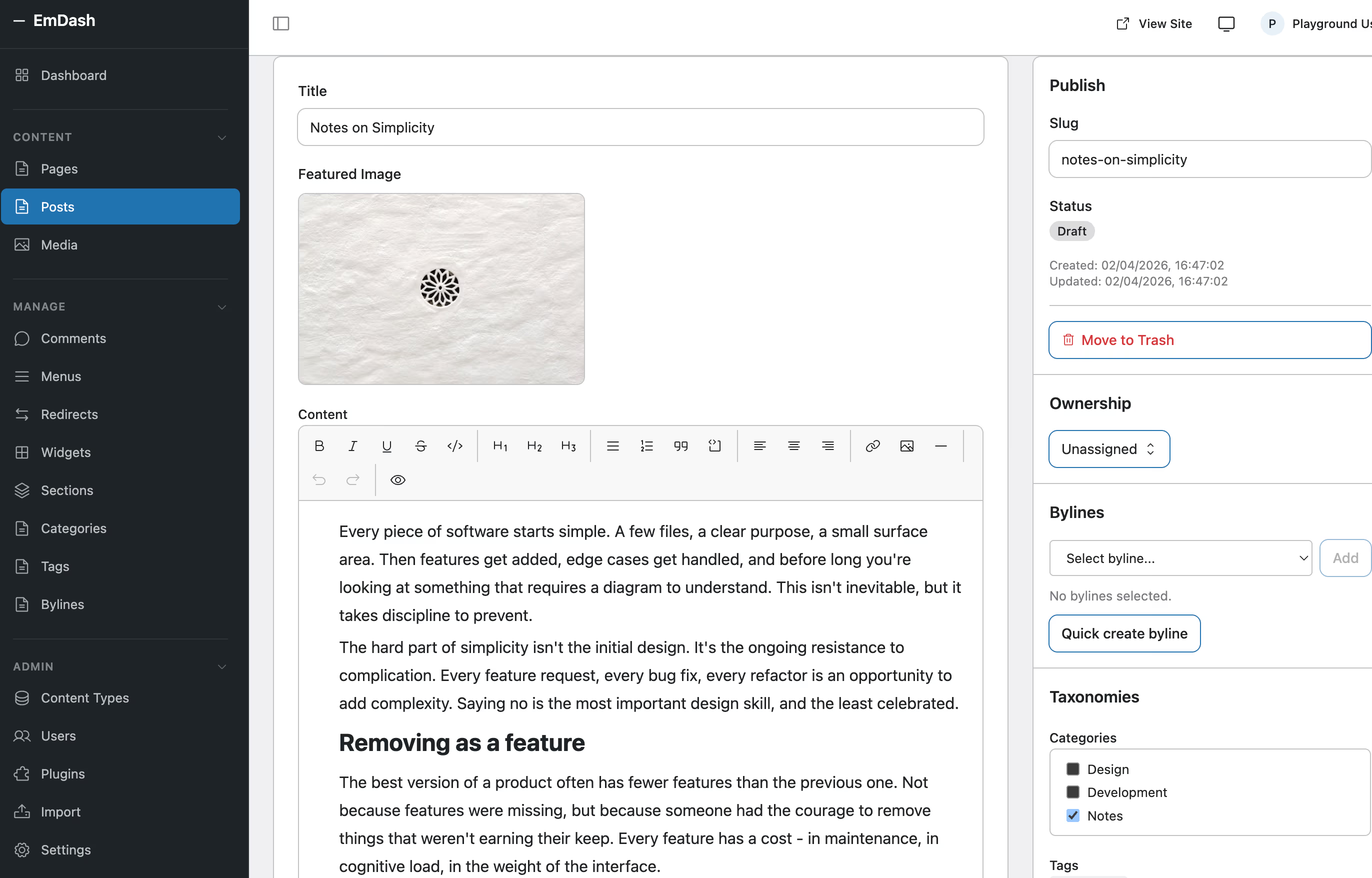
- Admin panel - A browser-based interface for content editing, media management, and site configuration. The post editor includes a rich text toolbar with heading levels, lists, blockquotes, code blocks, links, images, and alignment options. WordPress users will recognize the general layout - title, featured image, content area on the left, publish settings and taxonomies on the right:
- REST API - A structured API for content delivery, following patterns familiar to anyone who has worked with the WordPress REST API or headless CMS platforms.
- Media library - Upload, organize, and serve media assets with built-in optimization for Cloudflare’s CDN.
- Plugin system - Extensibility through an Astro integration pattern, with plugins running in sandboxed environments.
- Structured JSON content - Content is stored as structured JSON rather than HTML blobs, making it machine-readable by default.
Architecture and technology stack
EmDash’s architecture represents a fundamentally different approach from WordPress. Where WordPress is a monolithic PHP application that runs on a LAMP stack, EmDash is a modular TypeScript application designed for serverless and edge deployment.
Astro as the foundation
Choosing Astro as the base framework is a strategic decision. Astro ships zero JavaScript to the browser by default, produces static HTML for content pages, and supports selective hydration through its Islands architecture. For a content management system, this translates directly to faster page loads and better Core Web Vitals scores without additional optimization work. If you want a deeper look at how Astro compares to other frameworks, see our Astro 5 vs Next.js 15 comparison.
Astro also provides a mature component model, built-in routing, and a growing ecosystem of integrations. By building on Astro rather than creating a framework from scratch, EmDash inherits years of framework development and community contributions. We have previously explored how Astro and WordPress can work together in a hybrid architecture - EmDash takes this a step further by replacing WordPress entirely.
Serverless and edge-first deployment
EmDash is designed to run on Cloudflare’s global network. Content is served from edge locations close to the user, and server-side logic runs in Cloudflare Workers. This eliminates the traditional server management overhead that comes with WordPress hosting - no PHP version updates, no MySQL tuning, no server scaling decisions.
The deployment model uses Cloudflare Pages for the frontend and Workers for API endpoints, with D1 (Cloudflare’s serverless SQLite database) for data storage and R2 (Cloudflare’s object storage) for media files. This is a fully managed infrastructure stack that scales automatically.
Structured content storage
One of the most significant architectural differences is how EmDash stores content. WordPress stores post content as serialized HTML in a MySQL wp_posts table. EmDash stores content as structured JSON with typed schemas. Every content field has a defined type, validation rules, and relationships.
This approach has several practical implications. Content is portable between systems without HTML parsing. It is queryable at the field level. It is consumable by AI tools, APIs, and other systems without scraping or transformation. The trade-off is that content authors work within a more constrained editing experience compared to WordPress’s freeform block editor.
Querying content in your Astro templates is straightforward - no WP_Query, no $wpdb, no custom SQL:
---
import { getEmDashCollection } from "emdash";
const { entries: posts } = await getEmDashCollection("posts");
---

{posts.map((post) => <article>{post.data.title}</article>)}
You can also generate TypeScript types from your content schema, so your editor catches type errors before they hit production:
npx emdash typesFor WordPress developers used to guessing field names from get_post_meta() calls, typed content schemas with autocompletion are a significant quality-of-life improvement.
Plugin security, the biggest innovation
If EmDash has one feature that makes seasoned WordPress developers sit up and take notice, it is the plugin security model. This is not an incremental improvement. It is a fundamentally different architecture for extensibility.
The WordPress plugin security problem
WordPress plugins run with full access to the PHP runtime environment. When you install a plugin, that code can read and write to the database, access the filesystem, make network requests, and execute arbitrary PHP. The WordPress plugin review team does an admirable job of screening plugins submitted to the official repository, but the architectural reality is that any plugin has the technical capability to do almost anything on your server.
This is not a theoretical concern. Supply chain attacks on WordPress plugins are a recurring security issue. A compromised plugin update can affect millions of sites simultaneously. The 2024 incidents involving compromised plugins on wordpress.org demonstrated this risk in stark terms. For a thorough look at current WordPress defensive practices, see our WordPress security hardening guide.
According to Patchstack data, 96% of WordPress vulnerabilities in 2025 originated from plugins. In WordPress, a plugin is like a tenant with a master key to the entire building - it has access to every room, every drawer, every lock.
EmDash’s sandboxed plugin model
EmDash runs plugins in sandboxed Dynamic Workers - isolated execution environments that have no direct access to the host system. Each plugin declares an explicit permissions manifest specifying what it needs: read access to specific content types, write access to certain API endpoints, network access to listed domains, and so on.
Here is what a real EmDash plugin looks like - this one sends an email notification when content is published:
import { definePlugin } from "emdash";

export default () => definePlugin({
  id: "notify-on-publish",
  version: "1.0.0",
  capabilities: ["read:content", "email:send"],
  hooks: {
    "content:afterSave": async (event, ctx) => {
      if (event.collection !== "posts" || event.content.status !== "published")
        return;
      await ctx.email!.send({
        to: "editors@example.com",
        subject: `New post published: ${event.content.title}`,
        text: `"${event.content.title}" is now live.`,
      });
      ctx.log.info(`Notified editors about ${event.content.id}`);
    },
  },
});
Notice the capabilities array at the top: ["read:content", "email:send"]. This plugin explicitly declares it needs to read content and send emails - nothing more. If it tried to access the database directly or make an arbitrary HTTP request, the runtime would block it. Compare this to a WordPress plugin, where a simple notification plugin has the same technical access as your security firewall.
The runtime enforces these permissions. A plugin that declares it needs read access to blog posts cannot write to user accounts. A plugin that does not declare network access cannot make outbound HTTP requests. This is conceptually similar to how mobile app permissions work on iOS and Android - a model that users already understand.
As reported by Phoronix and TechRadar, this sandboxed approach is one of the most discussed technical features of EmDash. It directly addresses one of WordPress’s most persistent and legitimate security criticisms.
Practical implications
For site owners, sandboxed plugins mean significantly reduced risk from third-party code. For plugin developers, it means additional work declaring permissions and working within constraints. For the ecosystem overall, it means that security is enforced architecturally rather than relying on code review alone.
EmDash’s sandbox also wraps themes - themes cannot execute database operations. In WordPress, a theme can technically do almost anything, including modifying user data. EmDash eliminates this entire class of threats architecturally.
As the Cloudflare blog puts it: “Plugins are securely sandboxed and can run in their own isolate, via Dynamic Workers, solving the fundamental security problem with the WordPress plugin architecture.”
The question is whether plugin developers will accept these constraints or find them too restrictive for complex use cases. WordPress’s unrestricted plugin model is simultaneously its greatest strength (anything is possible) and its greatest weakness (anything is possible, including malicious actions).
AI-native design
EmDash is built with AI integration as a first-class concern, not an afterthought. This is reflected in several design decisions that distinguish it from WordPress and most other CMS platforms.
Typed schemas for machine consumption
Because EmDash stores content as structured JSON with typed schemas, AI tools can interact with content programmatically without parsing HTML or guessing at document structure. Every content field has metadata describing its type, purpose, and relationships. This makes content inherently accessible to large language models, search engines, and automated workflows.
MCP server support
EmDash includes built-in support for the Model Context Protocol (MCP), the emerging standard for connecting AI agents to data sources. This means an AI assistant can query, create, and modify content in EmDash through a standardized interface. For agencies and content teams experimenting with AI-assisted content workflows, this is a notable capability.
AI agent workflows
The combination of structured content, typed APIs, and MCP support creates an environment where AI agents can operate as content collaborators. An agent can read existing content, understand its schema, generate new content that conforms to the same structure, and submit it for review - all through documented, typed interfaces rather than screen scraping or brittle integrations.
WordPress has been adding AI features through plugins like Jetpack AI and third-party tools, but these are bolted onto an architecture that was not designed for machine interaction. EmDash’s advantage here is that machine readability is built into the data model from the start.
Details that make the difference
Beyond the main architectural pillars, EmDash introduces several smaller but significant innovations:
- Passkey authentication by default - zero passwords, zero brute-force attacks. In WordPress, passkey authentication requires additional plugins.
- Built-in pay-per-use content (x402 header) - the ability to sell individual articles or sections without subscriptions. An ideal scenario for AI agents as content “customers.”
- Custom Post Types become “collections” - WordPress CPTs become typed collections with full schema validation.
- Runs on your own hardware - the MIT license and Astro architecture allow deployment on any platform, not just Cloudflare (though it runs best there).
Cloudflare openly admits that a significant portion of EmDash’s code was written with the help of AI agents. The entire CMS was built in roughly two months - itself a demonstration of what an AI-native approach means in practice.
WordPress migration path
Cloudflare clearly understands that EmDash cannot succeed without addressing the migration question. The project includes specific tools and documentation for WordPress users considering a transition.
Theme porting
EmDash provides a theme porting guide that maps WordPress template hierarchy concepts to Astro’s routing and layout system. WordPress template files like single.php, archive.php, and page.php have corresponding patterns in Astro’s file-based routing. The styling layer (CSS) is largely portable, though PHP template tags obviously need to be rewritten as Astro components.
Plugin porting
A plugin porting guide walks WordPress plugin developers through reimplementing their functionality as EmDash plugins. The guide covers mapping WordPress hooks (actions and filters) to EmDash’s event system, converting database operations from $wpdb to EmDash’s content API, and adapting admin interfaces from PHP to the React-based admin panel.
Content migration
EmDash includes a built-in WordPress importer accessible directly from the admin panel under Import. The interface offers two options: enter your WordPress site URL and EmDash will check what import options are available, or upload a WordPress export file (WXR .xml) directly. The process follows a three-step wizard - Connect, Review, Import - that converts posts, pages, custom post types, categories, tags, and media into EmDash’s structured content format.
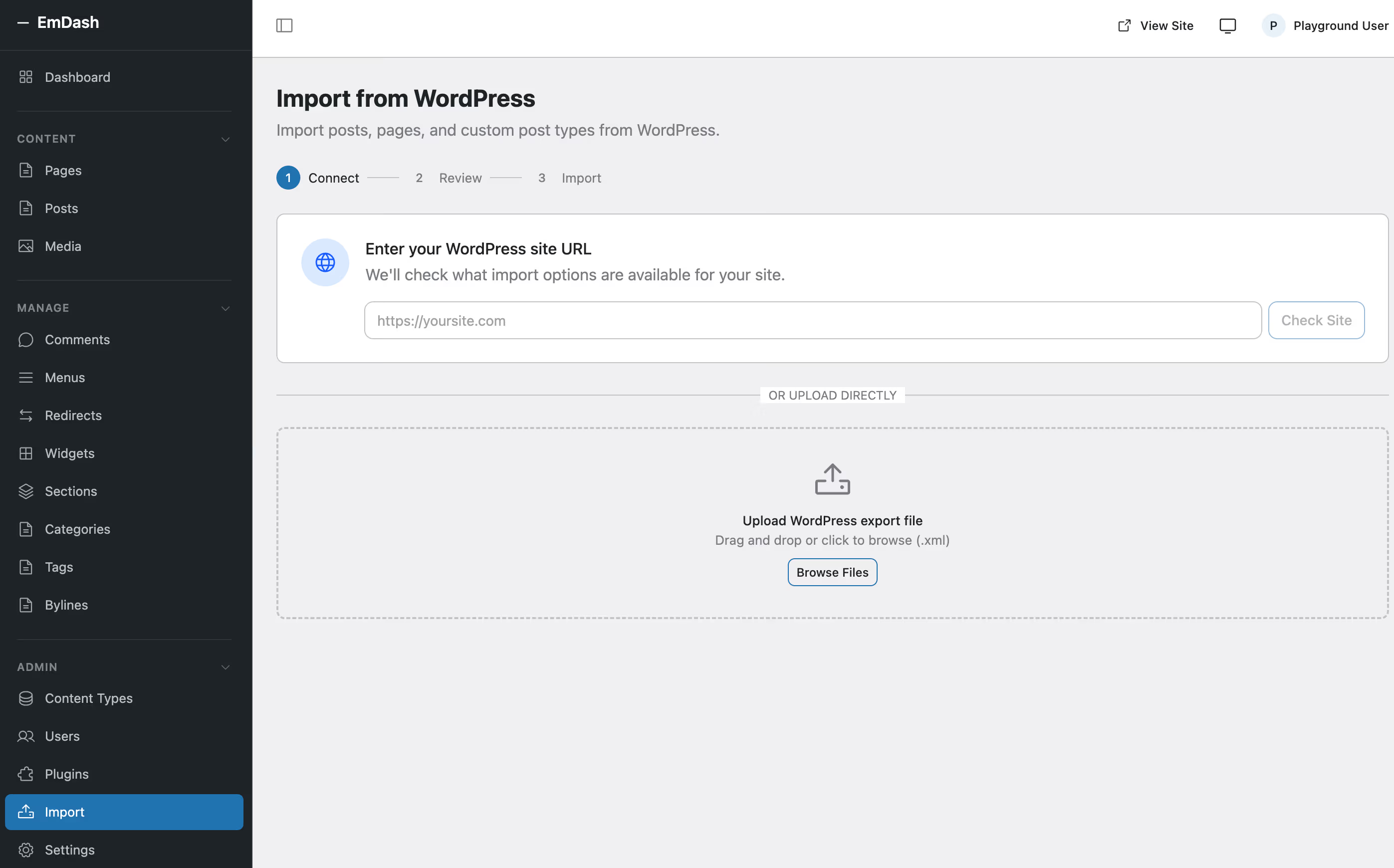
The tool handles basic content conversion, though complex shortcodes and custom block types require manual attention.
Realistic assessment
While these migration tools exist, they are early-stage and best suited for simple sites. A WordPress site with dozens of plugins, custom post types, WooCommerce, and years of accumulated customization is not a realistic migration candidate today. The migration path is more relevant for developers evaluating EmDash for new projects who want to bring over content from an existing WordPress blog.
What the community says
The response to EmDash has been loud, varied, and genuinely interesting. Developers, bloggers, and industry commentators have weighed in across multiple platforms, and the discussion reveals real fault lines in how people think about the future of content management.
The positive reaction
On Hacker News, the top-voted comments praised the sandboxed plugin model as “what WordPress should have done a decade ago.” Many developers expressed relief at seeing a CMS built with TypeScript and modern tooling rather than PHP. The serverless deployment model was highlighted as eliminating entire categories of WordPress hosting pain points - no more debugging PHP version conflicts, memory limits, or MySQL connection timeouts.
Several commenters on Reddit’s r/webdev noted that EmDash’s structured content model is better aligned with how content is consumed in 2026 - through APIs, AI agents, and headless frontends rather than through server-rendered HTML pages.
The HN thread collected over 650 points and 480 comments within 24 hours.
Joost de Valk, the creator of Yoast SEO and a prominent figure in the WordPress community, wrote a measured blog post acknowledging EmDash’s technical merits while cautioning against premature declarations of WordPress’s demise. His position - that EmDash addresses real architectural limitations in WordPress but faces an enormous ecosystem gap - is representative of the thoughtful middle ground. Joost also wrote on LinkedIn: “Not an April Fools joke” and announced he would build on EmDash.
A community member already recreated a tribute to the classic Kubrick theme (blue gradient with flower) in EmDash - looks identical, but with zero PHP.
The critical reaction
The criticism falls into several categories. First, EmDash’s editor is described as sparse and utilitarian compared to WordPress’s block editor (Gutenberg). For content creators who are not developers, the editing experience is a significant step backward. Second, the plugin ecosystem is effectively nonexistent. WordPress has over 60,000 plugins in its official repository alone. EmDash has a handful of example plugins and an architecture document.
Some Hacker News commenters were skeptical of Cloudflare’s motives, noting that EmDash is architecturally optimized for Cloudflare’s infrastructure stack (Workers, D1, R2, Pages). While the project is open-source and can theoretically run elsewhere, the practical deployment path leads directly to Cloudflare’s paid services. This is a legitimate concern that the community will continue to monitor.
CyberNews reported on the announcement with particular attention to the security implications, noting that the sandboxed plugin model could set a new industry standard for CMS extensibility regardless of whether EmDash itself succeeds.
Others pointed out the timing - announcing a “WordPress killer” on April 1 - as either brilliantly provocative marketing or a sign that Cloudflare is hedging its bets. If EmDash does not gain traction, the date gives them plausible deniability.
The practitioner perspective: Andy Peatling’s thread
On April 4, Andy Peatling (@apeatling) posted a nuanced thread that quickly became the most grounded take in the entire EmDash discourse. Retweeted by Brad Williams and others in the WordPress community, it collected 96 likes, 37 bookmarks, and 7,000 views within two days.
Peatling’s core argument is that the “is WordPress dead” framing misses the point entirely. He writes: “Current generation AI tools can generate a brochure site. They cannot reliably build a complex site that works the way a real business needs it to.” His daily experience building in this space gives this claim weight that armchair architectural critiques lack.
The most striking insight in the thread is about the editing and trust problem. Even if AI site generation were completely solved, Peatling argues, the editing problem remains wide open. “Just use a chatbot to make changes” sounds compelling until a restaurant owner needs to verify that the bot updated the correct hours on the correct page. A CMS save button requires more steps than a prompt, but those steps are verifiable. That verifiability matters to the people who actually run businesses on these platforms.
The replies split into predictable camps. @hedgecast agreed that “the editing problem is the real one. Generating is almost solved. Trusting that the generation did the right thing is nowhere close.” Peatling pushed back even on this, noting that “almost solved” is generous: “I think there’s a serious last 10% problem, and that is more like 30% as you ramp up the complexity and requirements.”
@AlxAndrws countered with real-world results, claiming to have built multiple AI-first sites replacing WordPress since January with “every single metric better.” Peatling’s response was characteristically pragmatic: “Tell me more about what tools you are using… Do these sites end up being used and managed by end users or developers? That’s my main point here.” This question cuts to the heart of the entire debate — tech demos and developer-managed sites are not the same as products that non-technical business owners operate daily.
@XanderSeb, a WordPress marketing attribution developer, expressed the frustration of the technically minded: “WordPress is slacking big. I wish it wasn’t, but it is… techy people are leaving.” But @missamychan offered the counter-narrative that many WordPress loyalists share: “I have 5 of my sites on WordPress. I’ve tried using other ones but always end up just shutting them down and back to growing my current websites.”
Peatling closed with a line that should be the starting point for every WordPress vs. anything discussion: “The WordPress data model is imperfect. It’s also fine to work with, I’m living it. Not everything that’s imperfect needs an immediate and complete refactor. Start from what users need. Work backwards to the architecture.”
This thread matters because it reframes the EmDash conversation away from architecture and toward usability. EmDash may have better plugin sandboxing, better content schemas, and better AI integration. But none of that matters if the people who actually manage websites daily — small business owners, content editors, marketing teams — cannot trust the tools to do what they need reliably and verifiably.
What this means for WordPress
Let us be direct: EmDash is not replacing WordPress in 2026, and probably not in 2027 either. WordPress powers over 40% of the web. It has a two-decade head start, an ecosystem of 60,000+ plugins, tens of thousands of themes, millions of developers, and an economic engine of hosting companies, agencies, and freelancers that depends on its continued dominance.
EmDash has a GitHub repository, a beta release, and a blog post.
But direction matters
The reason EmDash deserves serious attention is not its current state but what it represents directionally. The architectural decisions in EmDash - sandboxed plugins, structured content, serverless deployment, AI-native design - address real and acknowledged limitations in WordPress. We explored these trends in our article on the future of WordPress: 2026-2030 roadmap, and EmDash is a concrete manifestation of the pressures we described. These are not imaginary problems. WordPress security incidents related to plugins are frequent. WordPress’s HTML content storage is increasingly misaligned with how content is consumed. WordPress’s server requirements are overhead in a serverless world.
If EmDash (or a project like it) gains meaningful traction, it will create pressure on WordPress to accelerate its own modernization. That pressure is arguably healthy for the WordPress ecosystem regardless of the outcome.
Ecosystem lock-in works both ways
WordPress’s enormous plugin ecosystem is its strongest competitive advantage and also a form of lock-in. Site owners with complex WordPress installations are not choosing WordPress because it is the best technical architecture - they are choosing it because the specific combination of plugins, themes, and customizations they depend on only exists in WordPress.
EmDash cannot replicate that ecosystem quickly. Even if every technical decision in EmDash is superior, the ecosystem gap means WordPress remains the pragmatic choice for most projects for years to come.
Different tools for different contexts
The most realistic near-term outcome is coexistence. EmDash is well-suited for greenfield projects built by developers who want a modern TypeScript stack, serverless deployment, and structured content. WordPress remains the right choice for established sites, content-heavy publications that depend on the block editor, e-commerce sites running WooCommerce, and any project that needs specific plugins from WordPress’s ecosystem. For a broader view of how different platforms compare, see our top 10 CMS platforms for 2026 and 10 CMS systems: market share and the rise of headless.
What agencies and developers should do now
If you run a WordPress agency or work as a WordPress developer, here is a practical action plan for responding to EmDash’s launch.
Experiment, do not migrate
Spin up an EmDash project locally. Build a simple blog or portfolio site with it. Understand the developer experience firsthand. Do not migrate any production WordPress sites. The beta status, sparse documentation, and absent plugin ecosystem make production use premature.
Watch the repository
Star the GitHub repository and follow its development. Pay attention to the plugin ecosystem growth, the contributor community, and whether Cloudflare continues to invest in the project after the initial announcement. Many ambitious open-source projects lose momentum after the launch hype fades.
Understand the architectural direction
Regardless of whether EmDash specifically succeeds, the architectural patterns it embodies - sandboxed extensibility, structured content, serverless deployment, AI-native design - are the direction the industry is moving. Understanding these patterns makes you a better developer even if you never deploy an EmDash site.
Maintain your WordPress expertise
WordPress is not going anywhere soon. The installed base is enormous, the economic ecosystem is robust, and WordPress 6.x continues to improve. Agencies that abandon WordPress expertise prematurely will lose business. Agencies that refuse to learn anything new will eventually fall behind. The balance is clear: maintain your WordPress core competency while expanding your awareness of emerging alternatives.
Evaluate for new projects
When a new project comes in that fits EmDash’s strengths - a developer-centric site, a content API, a project that needs serverless deployment - consider whether EmDash is worth evaluating alongside WordPress. For most client projects in 2026, WordPress will still win that evaluation. But running the evaluation keeps your skills sharp and your perspective current.
Where EmDash stands today
EmDash is a technically ambitious, architecturally thoughtful CMS that addresses real limitations in WordPress’s design. The sandboxed plugin model is a genuine innovation. The structured content storage is better aligned with modern consumption patterns. The serverless deployment model eliminates operational overhead that WordPress site owners deal with daily.
It is also a v0.1.0 beta with no plugin ecosystem, a sparse editor, uncertain long-term investment from Cloudflare, and the enormous challenge of competing against the most successful CMS in the history of the web.
For WordPress professionals, EmDash is not a threat today. It is a signal. It tells us what the next generation of content management might look like, and it gives us a concrete codebase to study and learn from. The smartest response is neither fear nor dismissal - it is curiosity.
Install it. Build something small. Form your own opinion. Then go back to your WordPress projects with a slightly broader perspective on where this industry is heading.
The CMS landscape has a new entrant. Whether it becomes a serious contender or a footnote depends on execution, ecosystem growth, and whether the community shows up to build on it. We will be watching closely from wppoland.com and reporting on its progress as it develops.
The biggest takeaway? WordPress was created because one person wanted a simpler blog. EmDash was created because the largest CDN network in the world said: “What if we built WordPress from scratch in 2026?” And they did. Now it is up to the community to decide whether this experiment becomes a standard.
For a detailed feature-by-feature comparison, see our EmDash vs WordPress comparison table.
Building on Astro yourself? Learn more about my Astro development services.